Boost Browser Audio Beyond Default Limits
Increase the volume of videos, music, podcasts, live streams, online classes, and meetings directly in your browser. Enjoy louder, clearer sound with a simple and lightweight Chrome extension.
- 100% Free
- No Sign-Up
- Light Weight
Works Perfectly on Your Favorite Websites
Increase the volume while watching videos, listening to music, attending online classes, joining meetings, or streaming live content across the web.
YouTube
Music, Videos & Live Streaming
SupportedNetflix
Movies, Series & Documentaries
SupportedSpotify
Music, Podcasts & Playlists
SupportedVideos, Watch & Reels
SupportedVimeo
Professional Video Hosting
SupportedTwitch
Live Game Streaming
SupportedDisney+
Movies, Series & Originals
SupportedPrime Video
Amazon Movies & Shows
SupportedUdemy
Online Courses & Learning
SupportedCoursera
University Courses Online
SupportedZoom
Meetings & Webinars
SupportedGoogle Meet
Video Conferencing
SupportedDailymotion
Video Sharing Platform
SupportedTikTok Web
Short Videos & Reels
SupportedSoundCloud
Music & Audio Streaming
SupportedEverything You Need for Better Browser Audio
Control audio exactly the way you want with powerful features designed for videos, music, online meetings, streaming platforms, and everyday browsing.
Increase Volume
Boost audio beyond the browser's default limit for louder playback.
✓ Included FreePer-Tab Volume Control
Adjust the sound level independently for every browser tab.
✓ Included FreeReal-Time Audio Adjustment
Change volume instantly without refreshing the page.
✓ Included FreeLightweight Performance
Optimized for speed with minimal CPU and memory usage.
✓ Included FreePrivacy First
Runs locally inside your browser without collecting personal data.
✓ Included FreeEasy One-Click Control
Simple interface with an intuitive volume slider.
✓ Included FreeWorks on Popular Websites
Compatible with video, music, streaming, and learning platforms.
✓ Included FreeSmooth Audio Experience
Maintain clear audio while increasing volume.
✓ Included FreeModern Interface
Clean, responsive, and easy-to-use popup with real-time controls.
✓ Included FreeNo Registration Required
Install and start using instantly without creating an account.
Lightweight Extension
Tiny file size with zero impact on browsing speed.
Secure Local Processing
All audio adjustments happen directly in your browser.
Fast Real-Time Controls
Instant volume changes with no lag or refresh needed.
Start Boosting Your Audio in Three Easy Steps
Install the extension, open your favorite website, and increase the volume instantly. No account, no complicated settings, and no technical knowledge required.
Install the Extension
Add Volume Booster to Chrome with a single click from the Chrome Web Store.
Less Than One MinuteOpen Any Website
Open YouTube, Netflix, Spotify, online classes, meetings, or any supported website.
Works InstantlyIncrease the Volume
Use the extension popup to adjust the volume in real time and enjoy louder, clearer audio.
Real-Time ControlReady to Experience Louder Audio?
Install Volume Booster today and enjoy better sound on your favorite websites in seconds.
Install for ChromeExperience Volume Booster Before You Install
Move the slider below to see how Volume Booster lets you increase browser audio instantly. This demo simulates the extension interface and gives you a preview of the user experience. Explore all features and see how it works across compatible browsers.
Ready for the Full Experience?
Install Volume Booster today and enjoy louder sound across your favorite websites.
Install for ChromeA Smarter Way to Control Browser Audio
Enjoy louder, clearer audio with a lightweight extension built for speed, privacy, and simplicity. Volume Booster gives you full control without slowing down your browser. It's compatible with all major browsers – check the full browser compatibility list. If you ever run into an issue, you can easily report a bug.
Lightweight Performance
Minimal CPU & memory usage, never slows your browsing.
Privacy First
All audio processing happens locally – no data is ever sent anywhere.
Real‑Time Volume Control
Adjust audio instantly on any tab without refreshing the page.
One‑Click Setup
Install and start boosting volume in seconds – no account needed.
Modern Interface
Clean, intuitive popup with a large slider and visual feedback.
Works Across Popular Websites
Compatible with YouTube, Netflix, Spotify, Zoom, and many more.
Ready to Upgrade Your Browser Audio?
Install Volume Booster today and enjoy louder, clearer sound across your favorite websites.
Your Privacy Always Comes First
Volume Booster is built to work directly inside your browser. Your audio settings stay on your device, giving you complete control without requiring an account or sharing personal information. Learn more about our permissions, accessibility commitment, or suggest improvements on our feature request page.
No Login Required
Start using the extension immediately without creating an account.
No Cloud Storage
Your settings remain on your own browser instead of being uploaded to external servers.
No Personal Data Collection
The extension is designed without collecting personal information or browsing history.
Runs Locally
All functionality works directly inside your browser for better speed and privacy.
Secure Experience
Built with modern browser technologies for a safe and reliable user experience.
Lightweight & Fast
Efficient processing with minimal impact on browser performance.
Privacy Is Built Into Every Session
Volume Booster operates directly within your browser, allowing you to control audio without unnecessary permissions, accounts, or external data processing.
Explore the Volume Booster Interface
Take a closer look at the clean, intuitive, and lightweight interface designed to help you control browser audio quickly and easily.
Modern Interface
Clean and intuitive popup.
Lightweight Design
Fast loading and responsive controls.
Easy Navigation
Everything is accessible within a few clicks.
Ready to Experience It Yourself?
Install Volume Booster today and enjoy complete control over browser audio with a simple and modern interface.

Learn More About Better Browser Audio
Explore expert guides, troubleshooting tutorials, and practical tips to improve browser audio quality, increase volume safely, and get the most from Volume Booster.
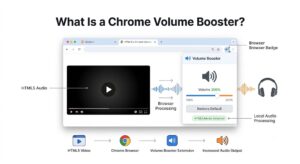
Chrome Volume Booster
Learn how the Chrome Volume Booster extension works and how to use it effectively.
Read Article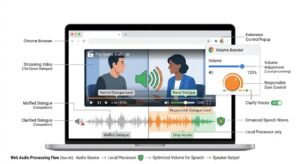
Enhance Dialogue in Movies and Shows
Discover settings to make voices clearer while watching Netflix and other platforms.
Read Article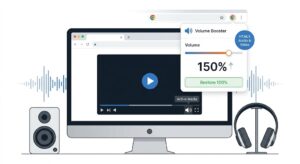
Increase Browser Volume Beyond the Default Limit
Step‑by‑step guide to safely boost audio past the browser's maximum.
Read Article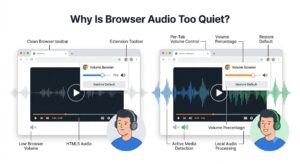
Browser Audio Sound Too Quiet
Common reasons why Chrome audio is low and how to fix it quickly.
Read Article
Boost YouTube Volume Above Maximum
A complete guide to getting louder YouTube playback without extra hardware.
Read Article
Fix Low Volume on Netflix in Chrome
Quick solutions when Netflix volume is too quiet on your laptop or desktop.
Read ArticleDiscover More Audio Tips and Guides
Read practical tutorials, troubleshooting articles, and browser audio tips to get the best experience with Volume Booster.
What Users Say About Volume Booster
Thousands of users rely on Volume Booster every day for louder audio, better listening experiences, and a simple interface that works across popular websites.
Alex Johnson
Daily User
"The extension is simple to use and gives me better control over browser audio while watching videos."
Sarah Williams
Student
"I use it daily during online meetings and classes. The interface is clean and everything works smoothly."
Michael Chen
Content Creator
"Lightweight, easy to install, and works on the websites I use most. Exactly what I needed."
Emily Rodriguez
Chrome User
"I like how quickly I can adjust audio without opening complicated settings."
David Kim
Developer
"The clean interface and fast controls make this one of my favorite browser extensions."
Lisa Thompson
Verified User
"It works well for music, podcasts, and streaming videos. Installation took less than a minute."
4.9 / 5 User Satisfaction
Based on feedback from users across supported websites.
Report a Bug
Found a problem or unexpected behavior? Let us know so we can improve the extension.
Report a BugNeed Help?
Browse troubleshooting guides or contact our support team if you have any questions.
Visit SupportHave Questions? We've Got Answers
Find answers to the most common questions about installation, compatibility, privacy, supported websites, and using the Volume Booster Chrome Extension.
Volume Booster is a lightweight Chrome extension that lets you increase the volume of videos, music, podcasts, online meetings, and live streams beyond the browser's default limit. It works directly inside your browser with a simple popup interface and real‑time controls.
Installation takes less than a minute. Visit the Chrome Web Store, search for “Volume Booster”, and click “Add to Chrome”. The extension icon will appear in your browser toolbar, ready to use immediately – no account or sign-up required.
Volume Booster works with most websites that use HTML5 video and audio players, including YouTube, Netflix, Spotify, Twitch, Zoom, Google Meet, Udemy, and many more. For a complete list, check our compatibility page.
No. Volume Booster runs locally inside your browser and does not collect, store, or transmit any personal data, browsing history, or audio information. Your privacy is fully respected – you can review the details on our permissions page.
Yes. Once installed, the extension works entirely on your device. As long as the website or media is loaded in your browser, you can adjust the volume – even without an internet connection.
Absolutely. Volume Booster lets you control audio independently for every browser tab. Simply open the extension popup on the tab you want to boost, and the settings apply only to that specific tab.
Yes, the extension is completely free. There are no hidden fees, subscriptions, or premium versions – you get the full volume control experience at no cost.
Some websites use custom media players that may not be fully compatible. If you encounter issues, try refreshing the page or check our support page. You can also report a bug and we'll investigate.
How It Works
Learn how Volume Booster works and how to get the best listening experience.
Read GuideReady to Experience Louder Audio?
Install Volume Booster today and enjoy better sound across your favorite websites.
No account required • Privacy‑first • Install in under one minute