Understanding the Web Audio API for Everyday Users
You click play, and sound comes out. That feels simple — but inside your browser, a sophisticated system called the Web Audio API is often working behind the scenes. You don't need to be a developer to benefit from knowing what it does, why it exists, and how it shapes every podcast, video, and song you hear in Chrome. This guide explains the Web Audio API in plain terms — no coding required.
- What the Web Audio API actually is — explained without technical jargon
- How it differs from basic HTML5 audio and why that matters for your ears
- Where the Web Audio API shows up in your daily browsing — often without you knowing
- How Volume Booster fits into the broader picture of browser audio control
What Is the Web Audio API, and Why Should Everyday Users Care?
The Web Audio API is a built-in audio engine that lives inside modern browsers like Google Chrome. Think of it as a high-precision sound studio that websites can tap into — not to play simple audio files, but to shape, route, and control sound in ways that basic playback cannot handle.
When you listen to a song on a streaming platform, watch a movie, or join a video call, your browser uses one of two paths to deliver sound to your speakers or headphones:
- The simple path: an HTML5
<audio>or<video>element plays the file directly. The browser handles volume, play, pause, and seeking. This is straightforward and works everywhere. - The advanced path: the Web Audio API takes over. The website can now split audio into channels, apply real-time effects, visualize sound waves, mix multiple sources together, or precisely control gain at a sample level. This is what powers interactive music apps, browser-based synthesizers, and spatial audio experiences.
You benefit from the Web Audio API every time a website offers features like live audio visualization, per-instrument volume mixing, or real-time audio effects — even if you never see the term mentioned. It's the invisible layer that makes advanced browser audio possible.
For a deeper look at how browser audio behaves in everyday scenarios, read about why browser audio sometimes sounds too quiet and what you can do about it.
How Does the Web Audio API Work Inside Your Browser?
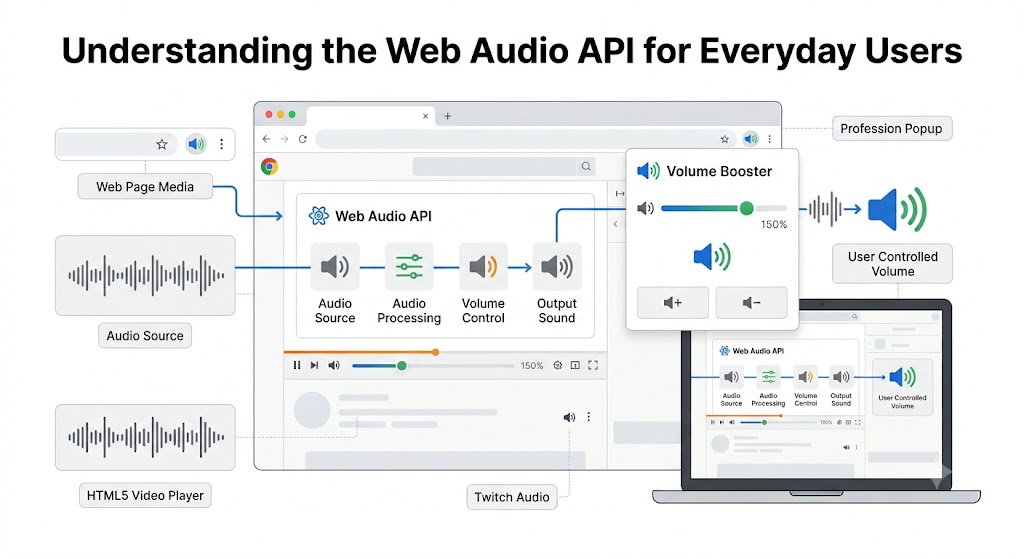
Understanding the Web Audio API starts with a simple mental model: imagine a modular audio rack. You connect an audio source to a series of processing nodes, then route the final output to your speakers. Each node does one specific job — adjusting volume, adding a filter, analyzing frequencies — and the signal flows through them in a chain.
Inside Chrome, the process follows a structured sequence:
- Audio context creation: The website creates an
AudioContext— the master controller for all audio operations. This is the entry point that everything else plugs into. - Source connection: An audio source is attached. This could be an
<audio>element, a microphone stream, an oscillator generating tones, or a buffer loaded with raw audio data. - Node graph construction: The source feeds into processing nodes. A gain node controls volume. A panner node positions sound in stereo space. An analyser node extracts frequency data for visualizations. Each node transforms the audio in a specific way.
- Destination output: The final node connects to the
audio destination— your laptop speakers, desktop speakers, Bluetooth headphones, or wired earbuds. That's where you hear the result.
All of this happens locally inside Chrome's sandboxed environment. No audio data travels to external servers during API processing. The Web Audio API operates entirely on your device, matching the privacy-first principles that tools like Volume Booster also follow.
If you've ever wondered how to push browser audio further, check out how to increase browser volume beyond the default limit without compromising sound quality.
How Is the Web Audio API Different from Standard HTML5 Audio?
This is the question that trips up most everyday users — and it's worth answering clearly. Both the Web Audio API and HTML5 audio produce sound in your browser, but they operate at completely different levels of control and complexity.
Here's the practical breakdown:
- HTML5 audio is a playback tool. You give it a file, it plays it. You get basic controls: play, pause, volume, and seek. The browser handles everything internally. This is what most websites use for embedded audio, podcast players, and simple video playback.
- The Web Audio API is an audio processing engine. It doesn't just play audio — it manipulates it in real time. Developers can adjust gain at a per-sample level, crossfade between tracks, apply convolution reverb, or generate entirely new sounds from scratch. It's the difference between a cassette player and a mixing desk.
Both can coexist. A website might load a video with an HTML5 <video> element for the visuals, then route its audio track through the Web Audio API for additional processing like equalization or volume normalization.
Volume Booster primarily enhances HTML5 media volume — working directly with <audio> and <video> elements on pages like YouTube, Netflix, and Spotify. The Web Audio API represents a different, more complex layer that some advanced web apps use for features beyond simple volume boosting.
Learn more about solving quiet playback on specific platforms in our guide on how to boost YouTube volume above maximum.
What Can the Web Audio API Do That Basic Browser Audio Cannot?
If HTML5 audio is a light switch — on or off, loud or quiet — the Web Audio API is a dimmer with infinite gradations. It unlocks capabilities that basic playback cannot touch.
Here are real-world examples of what the Web Audio API enables that standard HTML5 audio alone cannot deliver:
- Per-sample volume control: Instead of adjusting the overall loudness of a track, developers can shape the amplitude of individual audio samples — thousands per second. This enables smooth fades, ducking, and compression that sound natural and responsive.
- Real-time audio visualization: The API's analyser node extracts frequency and time-domain data from live audio. This powers the dancing waveform bars and spectrum visualizers you see on music platforms and podcast players.
- Multi-source mixing: A web app can play several audio streams simultaneously — background music, sound effects, voice narration — and mix them together with independent volume, panning, and effects for each channel.
- Spatial audio and 3D panning: Using the panner node, developers can position sounds in a three-dimensional space around the listener. This creates immersive experiences for games, virtual tours, and interactive storytelling — all inside a browser tab.
- Audio synthesis: The API can generate sounds from scratch using oscillators. Browser-based synthesizers, drum machines, and tone generators all rely on this capability.
None of these features exist in basic HTML5 audio playback. When you encounter a website that lets you mix tracks, see live audio waveforms, or experience surround-like positioning, you're experiencing the Web Audio API at work.
For everyday listening where you just need clearer, louder audio on streaming sites, check out how to fix low volume on Netflix in Chrome with simple, effective adjustments.
How Does Volume Booster Relate to the Web Audio API?
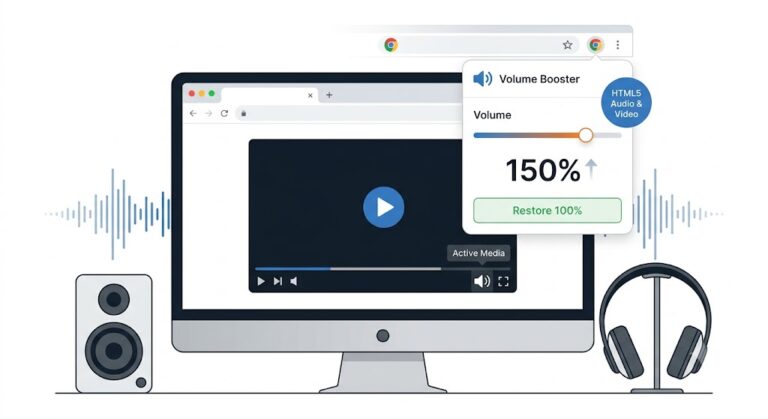
This is an important distinction — and one that honest documentation should make clear. Volume Booster is designed to increase and control audio volume for HTML5 media elements directly inside Google Chrome. It works with the <audio> and <video> tags that power most streaming sites, video players, and audio platforms.
The Web Audio API is a separate browser technology that some advanced web applications use for more complex audio processing. They operate at different layers of Chrome's audio stack.
Here's how the two relate in practical terms:
- Volume Booster's approach: The extension detects HTML5 media elements on the active tab and adjusts their playback volume through Chrome's extension APIs. The processing is straightforward — increase or decrease gain on the media element itself. Everything runs locally, with no audio ever leaving your browser.
- When the Web Audio API is involved: Some websites route their HTML5 media through the Web Audio API for additional processing before output. In these cases, the audio chain is more complex, but the fundamental principle of local-only processing remains the same.
- They complement each other: The Web Audio API gives developers tools for advanced audio manipulation. Volume Booster gives users a simple, accessible way to control loudness across all their browser tabs. Both serve the same ultimate goal — better audio in Chrome — just at different levels of the stack.
Volume Booster stays focused on what everyday users need most: a clean volume slider, per-tab control, instant adjustments, and zero privacy compromises. You don't need to understand the Web Audio API to use Volume Booster effectively — but knowing it exists helps you appreciate the rich audio ecosystem inside your browser.
For platform-specific audio improvements, see our guide on how to improve Disney+ audio quality in your browser.
When Does the Web Audio API Affect Your Everyday Listening?
You encounter the Web Audio API more often than you might think — usually without any visible indicator. Recognizing where it operates helps you understand why some websites sound different from others, even when playing similar content.
Common scenarios where the Web Audio API is actively processing what you hear:
- Interactive music platforms: Websites that let you isolate instrument tracks, adjust tempo, or loop specific sections of a song rely on the API's precise timing and multi-source mixing capabilities.
- Browser-based audio editors: Online tools for trimming, normalizing, or converting audio files use the API to read, process, and output sound without installing desktop software.
- Podcast players with smart features: Some web-based podcast platforms apply dynamic compression or loudness normalization through the API so that quiet voices and loud sound effects stay balanced.
- Video conferencing with audio effects: Noise suppression, echo cancellation, and virtual background audio processing in browser-based meeting tools often route microphone and speaker streams through the API.
- Games and interactive stories: Browser games that react to your actions with spatial sound effects, adaptive music, or real-time audio mixing depend heavily on the API's low-latency capabilities.
In all these cases, the Web Audio API works silently in the background. You hear the result — richer sound, smoother transitions, more immersive positioning — without ever interacting with the API directly. It's infrastructure that serves your ears invisibly.
When you're on streaming sites where audio is simply too quiet, the solution is often more straightforward. Read how to boost Prime Video volume without distortion for practical tips.
How the Web Audio API Shows Up in Real Daily Browsing
Here are concrete examples of everyday situations where the Web Audio API operates behind the scenes — and what that means for your listening experience.
Example 1: The Online Music Student Practicing with a Web-Based Tuner
- Situation: A violin student opens a browser-based instrument tuner that listens through the laptop microphone and displays pitch accuracy in real time.
- What happens technically: The website uses the Web Audio API to capture microphone input, run it through an analyser node to extract frequency data, and render a visual pitch indicator — all with latency low enough to feel instantaneous.
- What the user experiences: The tuner responds immediately to each note played. The student sees pitch feedback within milliseconds of bowing a string. No audio file is played — the API generates the entire interactive experience from a live input stream.
- Takeaway: Without the Web Audio API, real-time microphone analysis inside a browser tab would be impossible. The API turns Chrome into a responsive audio tool that replaces dedicated hardware tuners.
Example 2: The Podcast Listener Using a Web Player with Loudness Normalization
- Situation: A listener plays a podcast episode where the host speaks quietly but guest interviews are much louder. The web player advertises "consistent volume" as a feature.
- What happens technically: The player routes the podcast audio through a dynamics compressor node within the Web Audio API. Quiet sections are gently boosted, loud peaks are tamed, and the output stays within a comfortable range — all processed sample by sample in real time.
- What the user experiences: The listener no longer reaches for the volume knob between segments. The audio feels balanced and fatigue-free, even during a two-hour listening session on laptop speakers or Bluetooth headphones.
- Takeaway: The Web Audio API enables intelligent audio processing that adapts to content dynamically. It's not just about louder or quieter — it's about consistent, comfortable listening.
Example 3: The Remote Worker on a Browser-Based Video Call
- Situation: A remote team member joins a video call through a browser-based conferencing platform. Background noise from a nearby coffee shop threatens to disrupt the meeting.
- What happens technically: The platform uses the Web Audio API to apply noise suppression to the microphone input before transmitting it to other participants. Simultaneously, incoming audio streams from colleagues are processed for echo cancellation and automatic gain control.
- What the user experiences: Colleagues hear clear speech without coffee-shop clatter. The remote worker hears everyone at consistent volume levels without echoes or feedback loops. The call feels professional despite the noisy environment.
- Takeaway: The Web Audio API is the invisible backbone of clear browser-based communication. It processes audio bidirectionally — cleaning up what you send and smoothing what you receive — all without installing additional software.
Frequently Asked Questions About the Web Audio API
Do all websites use the Web Audio API?
No. Most websites that play simple audio or video use basic HTML5 media elements without ever touching the Web Audio API. The API is only invoked when a website needs advanced processing — audio visualization, real-time effects, multi-source mixing, or microphone analysis. For everyday streaming on YouTube, Netflix, or Spotify, HTML5 playback handles everything the Web Audio API isn't needed for.
Can the Web Audio API make my browser audio louder?
Technically, the Web Audio API includes gain nodes that can amplify audio beyond its original level. However, this capability is controlled by the website's code, not by the user. You cannot directly access the API to boost volume on a site that doesn't already use it. Volume Booster addresses this gap by giving you a simple, user-facing volume control that works across HTML5 media on any tab — no developer access required.
Does the Web Audio API affect my privacy or send audio to servers?
The Web Audio API processes audio entirely inside your browser's sandboxed environment. It does not inherently send data anywhere. However, a website using the API could choose to transmit processed audio to a server — that's a website behavior decision, not an API requirement. Volume Booster follows strict privacy principles: zero audio processing outside your device, no external requests, no data collection of any kind.
Why do some websites sound different even when using the same headphones?
Different websites process audio differently. One might play raw audio through HTML5 with no processing at all. Another might route the same file through the Web Audio API with equalization, compression, or stereo widening applied. The audio source might be identical, but the processing chain changes what reaches your ears. Browser extensions like Volume Booster work at the media element level, giving you consistent volume control regardless of how the site processes audio upstream.
Is the Web Audio API the same thing as a volume booster extension?
No, they are entirely different things. The Web Audio API is a low-level browser technology that developers use to build audio features into websites. A volume booster extension is a user-facing tool that gives you direct control over playback loudness. One is infrastructure for developers; the other is a convenience for listeners. They can coexist — a website might use the API for processing while you use Volume Booster to adjust overall output — but they serve different roles in the audio chain.
Does the Web Audio API work on all browsers?
The Web Audio API is supported in all modern browsers, including Google Chrome, Mozilla Firefox, Apple Safari, and Microsoft Edge. However, implementation details and performance characteristics vary between browsers. Chrome's implementation is generally considered fast and reliable, which is one reason many web audio applications recommend Chrome for the best experience. Volume Booster is built specifically for Chrome, leveraging its stable audio stack and Manifest V3 extension framework.
Understanding the Web Audio API Helps You Appreciate What Your Browser Can Do
The Web Audio API is one of those browser technologies that most users never need to think about — until they realize how much it quietly powers their daily listening. From interactive music tools to clear video calls to immersive games, this API transforms Chrome from a simple media player into a capable audio workstation.
Key takeaways from this guide:
- The Web Audio API is a built-in browser engine for advanced audio processing — separate from basic HTML5 playback but complementary to it.
- You encounter it daily in web-based music platforms, video conferencing tools, podcast players with smart features, and interactive audio applications.
- It operates entirely inside your browser's local environment, matching the privacy-first approach that Volume Booster also follows.
- Volume Booster focuses on giving you simple, effective control over HTML5 media volume — a different layer of the audio stack that solves the everyday problem of quiet playback.
- Understanding both the Web Audio API and tools like Volume Booster helps you get the best possible sound from Chrome, whether you're watching movies, streaming music, or joining remote meetings.
Because Volume Booster processes everything locally — no accounts, no cloud sync, no external servers, no tracking — you can use it alongside any website, whether that site uses the Web Audio API or not. Your audio stays on your device, your volume settings stay under your control, and your browsing remains private.
Ready to take control of your browser audio? Explore the Volume Booster Chrome extension to increase, fine-tune, and customize audio volume across all your tabs. Then check out our guide on boosting Spotify web player volume for platform-specific tips that make an immediate difference.